
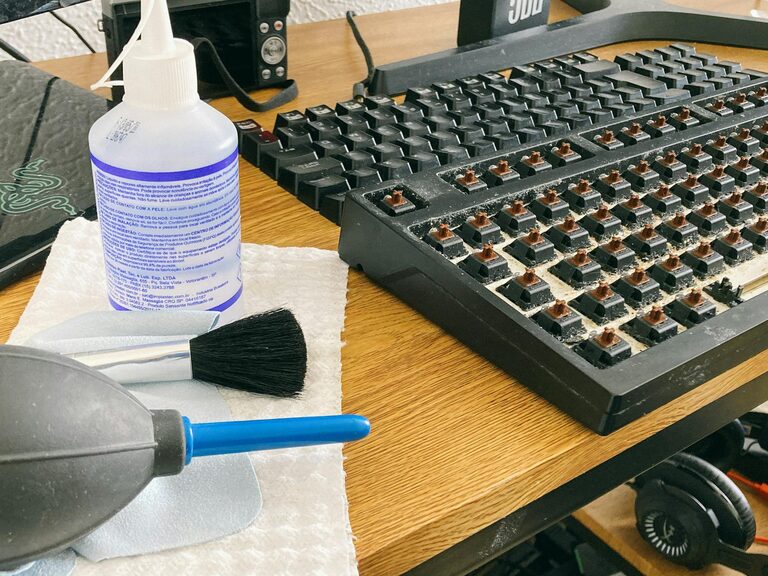
Keeping your phone and keyboard clean is essential not only for hygiene but also to maintain their performance and longevity. These devices are frequently touched and can accumulate dust, oils, and germs over time. However, cleaning them improperly can lead to damage. In this guide, we’ll walk you through safe and effective methods to clean your phone and keyboard.
Why Clean Your Phone and Keyboard?
Phones and keyboards are among the most-used devices in daily life. This constant contact means they easily collect dirt, oils from your skin, and bacteria. Regular cleaning helps to:
– Reduce the spread of germs
– Improve device appearance
– Prevent buildup that can affect performance
– Extend the lifespan of your electronics
Let’s explore how to clean each safely.
What You’ll Need
Before you start, gather the following items:
– Microfiber cloths (soft, lint-free)
– Isopropyl alcohol (70% or less concentration)
– Distilled water
– Cotton swabs
– Small soft-bristled brush or compressed air can
– Mild dish soap (optional)
– A clean, dry workspace
Avoid harsh chemicals, bleach, ammonia, or abrasive materials that can damage screens and surfaces.
—
How to Clean Your Phone Safely
Step 1: Power Off Your Phone
Always turn off your device and unplug any cables before cleaning. This prevents accidental inputs and protects your phone from moisture.
Step 2: Remove Case and Accessories
Take off any phone case, screen protectors if possible, and detach accessories like earbuds. Clean them separately using mild soap and water.
Step 3: Wipe Down the Exterior
– Mix a 50/50 solution of distilled water and isopropyl alcohol in a spray bottle if desired.
– Lightly dampen a microfiber cloth with the solution (do not soak).
– Gently wipe all surfaces of your phone, including the screen, back, and edges.
– Use a dry part of the cloth to remove any excess moisture.
Step 4: Clean Buttons and Ports
– Use a soft-bristled brush or a dry cotton swab to gently clean around buttons and any crevices, removing dust and debris.
– For charging ports and speaker grills, compressed air can help clear out particles. Avoid inserting any objects that may cause damage.
Step 5: Dry and Reassemble
– Ensure your phone is completely dry before powering it back on.
– Clean your phone case with soapy water, rinse, and dry it thoroughly before putting it back.
—
How to Clean Your Keyboard Safely
Step 1: Turn Off and Disconnect
If you’re using an external keyboard, unplug it or turn it off if wireless. For laptop keyboards, shut down the device.
Step 2: Remove Loose Debris
– Turn the keyboard upside down and gently shake it to dislodge crumbs and dust.
– Use compressed air to blow out particles from between the keys.
– A soft brush can help loosen stubborn debris.
Step 3: Clean the Keys
– Lightly dampen a microfiber cloth with a mixture of distilled water and a small drop of mild dish soap.
– Wipe the tops and sides of the keys carefully, avoiding excess moisture.
– For tight spaces, lightly moisten cotton swabs or use anti-static cleaning putty designed for keyboards.
Step 4: Disinfect the Keyboard
– Use a microfiber cloth dampened with 70% isopropyl alcohol to gently disinfect the keys.
– Avoid letting liquids drip under the keys.
– Alcohol evaporates quickly and is safe for electronics when used sparingly.
Step 5: Dry Your Keyboard
– Allow the keyboard to air dry completely before reconnecting or turning it back on.
– Ensure no moisture remains between the keys.
—
Tips for Maintaining Clean Devices
– Wash hands before and after using your devices to reduce grime buildup.
– Clean your phone and keyboard regularly, at least once a week, especially during cold and flu season.
– Use keyboard covers or phone screen protectors that are easier to clean.
– Avoid eating or drinking near your devices to minimize spills and crumbs.
—
What to Avoid When Cleaning
– Do not spray cleaners directly onto your devices.
– Avoid abrasive materials like paper towels or rough cloths.
– Steer clear of bleach, ammonia, or other harsh chemicals that can damage coatings.
– Never submerge your phone or keyboard in water.
—
Conclusion
Keeping your phone and keyboard clean doesn’t have to be complicated. With just a few simple tools and precautions, you can safely remove dirt, dust, and germs from your devices. Regular cleaning not only helps protect your health but also ensures your electronics stay in good working condition for longer. Make it a habit, and your tech will thank you!
—
Feel free to share your own cleaning tips or ask questions in the comments below!